Exact Instagram Image Sizes (2025): Resize in Seconds
Want your Instagram posts to look crisp everywhere—feed, Stories, Reels, and the grid—without trial and error? This guide lists the current 2025 dimensions and shows how to resize locally in your browser. No sign-up. No uploads. Just fast results.
Privacy note: Agmad tools process images on your device using browser APIs. Your files never leave your computer.
Quick Sizes (2025)
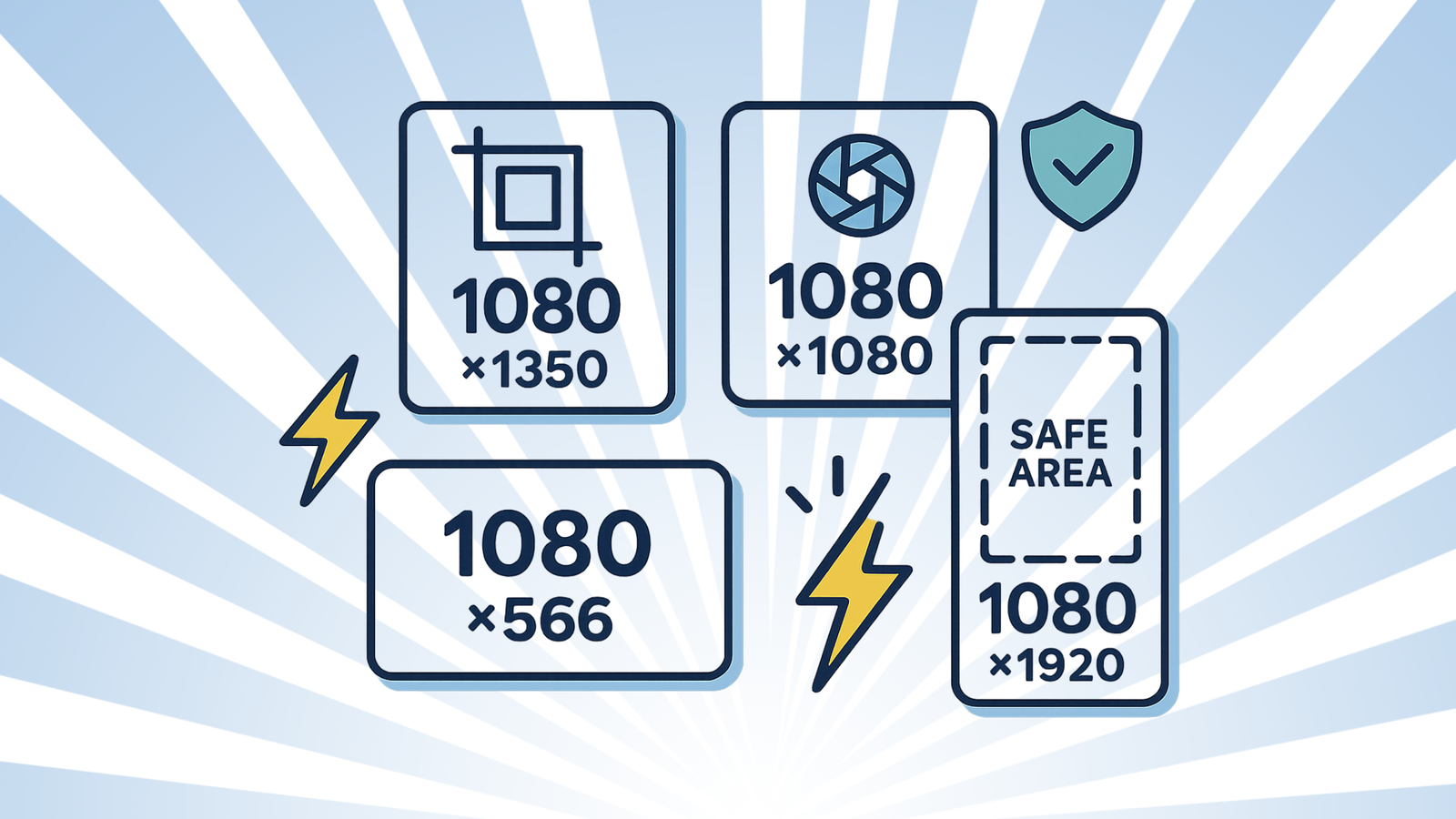
- Feed — Square: 1080 × 1080 px (1:1). Social Media Dashboard+1
- Feed — Portrait: 1080 × 1350 px (4:5). Buffer+1
- Feed — Landscape: 1080 × 566 px (~1.91:1 / 16:9). Buffer+1
- Stories / Reels canvas: 1080 × 1920 px (9:16). Snappa+1
- Profile photo (displays as circle): 320 × 320 px (upload larger for sharpness). Social Media Dashboard
- Instagram recommended upload range: width ≥1080 px; supported ratios from 1.91:1 to 3:4 (newer support). Instagram Help Centre+1
Heads-up: Instagram has also been testing 3:4 portrait support and a more vertical-first grid; aim to keep key content centered in portrait crops. Buffer+1
Instagram Safe Areas (don’t crop your text)
- Stories/Reels UI can cover edges. Keep text/logos within roughly the middle 1080 × 1610 px “safe” zone (≈ 155 px padding top/bottom). Social News Desk
- Feed previews may auto-crop tall images in some views; compose with the center 1:1 area in mind.
One-Minute Resize (local, no upload)
- Open Agmad Image Resizer
Click Choose File and drop your image. - Pick a preset
- Feed (Square): 1080×1080
- Feed (Portrait): 1080×1350
- Feed (Landscape): 1080×566
- Stories/Reels: 1080×1920
- Fit & crop
Use Cover for full-bleed crops, or Contain to letterbox (rare). - Export
- WebP (Q80) for posts/photos.
- PNG for logos/graphics with transparency.
- Optional: run through Agmad Image Compressor.
- Name smartly
leather-tote-portrait-1080x1350.webp(kebab-case helps SEO/organization).
Format & Workflow Cheatsheet
| Scenario | Size & Ratio | Format | Notes |
|---|---|---|---|
| Standard feed photo | 1080×1350 (4:5) | WebP/JPEG | Best engagement area on mobile. Buffer |
| Square grid look | 1080×1080 (1:1) | WebP/JPEG | Still a reliable classic. Analyzify |
| Wide landscapes | 1080×566 (~1.91:1) | WebP/JPEG | Use sparingly; smaller feed height. Social Media Dashboard |
| Stories/Reels | 1080×1920 (9:16) | MP4/MOV (video) or WebP/PNG (image) | Keep text within safe area. Snappa+2OneStream Live+2 |
| Profile | 320×320 | PNG/WebP | Upload larger; center face/logo. Social Media Dashboard |
Video note: Reels target ≥720p and ≥30 fps; up to 3 minutes in length (2025). Instagram Help Centre+1
Tips & Common Mistakes
✅ Tips
- Resize first, then compress. Biggest quality win.
- Export sRGB. Ensures consistent color across devices.
- Batch your assets. Create a feed + Stories version from the same master.
🚫 Mistakes
- Text too close to edges in Stories/Reels → UI covers it. (Use the safe area.) Social News Desk
- Posting 4K files expecting better quality → IG compresses; stick to the exact target size. Instagram Help Centre
- Using PNG for photos → heavy files; choose WebP/JPEG unless transparency is needed.
FAQs
What’s the best feed size for engagement?
1080×1350 (4:5) fills more vertical space on mobile while staying native to the feed. Buffer
Do I need to export bigger than 1080 px wide?
Not necessary for the feed; Instagram recommends uploading ≥1080 px width and will scale. Instagram Help Centre
Can I post 3:4 images now?
Instagram has added 3:4 support in 2025 in addition to 1:1 and 4:5; test with recent app versions. Buffer+1
What resolution and length for Reels?
Aim for 1080×1920, ≥30 fps, and (as of 2025) up to 3 minutes. Instagram Help Centre+2OneStream Live+2
Do it now (fast & private)
- 📏 Resize for Instagram (presets built-in) →
/tools/image-resizer/ - 🔁 Convert format (WebP/JPEG/PNG) →
/tools/image-converter/ - ⚡ Compress for speed →
/tools/image-compressor/
Related guides
- WebP vs JPEG vs PNG: Which Should You Use? →
/blog/webp-vs-jpeg-vs-png/ - JPEG → PNG Online — No Upload →
/blog/jpeg-to-png-online-no-upload/